Hey Linux radio hackers and flight tracking fans! 👋🐧✈️
Tired of jumping through hoops with Mono or complex setups just to get a decent map display for your local ADS-B traffic? Do you have dump1090 churning out data but find existing viewers a bit… much? If you're looking for a straightforward, native Linux application that does one thing well – mapping SBS-1 aircraft feeds – then you need to check out WaveADSB.
The Linux ADS-B Viewer Challenge
We love our Linux setups for radio projects! They're stable, flexible, and powerful. But sometimes, visualizing data like ADS-B can feel less native than we'd like. Popular solutions like Virtual Radar Server (VRS) are fantastic, but getting them running smoothly on Linux often involves installing the Mono framework, which can feel heavy and adds extra dependencies just for a map. Other web-based interfaces are great but tie up a browser tab and aren't always the most resource-friendly for a dedicated display.
WaveADSB: A Simple, Native Solution
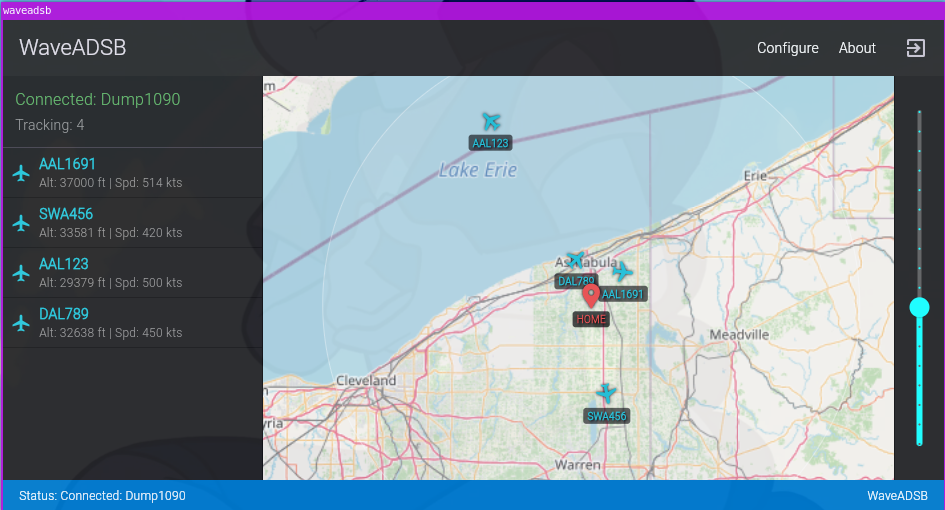
WaveADSB cuts through the complexity. It's designed from the ground up as a simple, lightweight graphical viewer that runs directly on your Linux machine. Forget Mono, forget web servers – all WaveADSB needs is a standard SBS-1 (BaseStation) network feed. If your dump1090 (or readsb, or similar decoder) is outputting data over TCP, WaveADSB can connect and display it.
Why WaveADSB on Linux?
- Truly Native: No Mono, no Wine, no browser tabs. Just a clean desktop application. ✨
- Simple Setup: Connects directly to your decoder's SBS-1 network output (like
dump1090 --neton port 30003). - Offline Capable: Download map tiles for your area and use it entirely offline – perfect for portable setups or areas with spotty internet. 🗺️💾
- Your Data Stays Local: Connects only to your specified feed on your local network. No cloud dependencies. 🔒
Getting Started: Connect Your Feed
Setting up is incredibly easy, assuming your ADS-B decoder is already providing an SBS-1 network feed (often enabled with a --net flag and available on port 30003).
- Launch WaveADSB: Start the WaveADSB application on your Linux desktop.
- Add Your Feed:
- Click "Configure" in the top bar, then select "Feeds".
- Click the "+" button to add a new feed source.
- Enter the IP address of the machine running your decoder (use
127.0.0.1if it's the same machine) and the Port (usually30003). Give it a helpful name. - Click "Save".
- Watch the Skies: WaveADSB will connect, and you should start seeing aircraft appear on the map and in the side list as your decoder picks them up! The status bar at the bottom keeps you informed. ✅
Key Features:
- Home Location: Right-click the map to set a home base and see 50/100 NM range rings. 🏠📍
- Offline Maps: Go to Configure > Map to download map areas around your home location using a simple slider for the radius. Don't forget to toggle "Offline Mode" ON when you need it!
- Flight Paths: Visualize aircraft tracks by enabling "Show Flight Paths" in the map configuration.
- Aircraft Details: Click any plane on the map or list for more info (ICAO, Alt, Speed, etc.).
If you've been searching for a no-fuss, native Linux application to visualize your local ADS-B traffic directly from your decoder's SBS-1 feed, give WaveADSB a try. It's the lean mapping companion your Linux radio setup deserves!
https://github.com/SarahRoseLives/WaveADSB
or, download a binary here: https://sarahsforge.dev/products/waveadsb-linux-
Happy Tracking!